Computer geeks...
Archived49 replies · 1,188 views
Start>Control Panel>Add or remove programmes
You should also look at performance and maintenance and run defrag and disk clean.
Jem, you could try downloading and installing CCleaner.
Really easy to use and cleans out your Internet browser cache (stored pages) as well as any temporary files clogging up the drive. If you've never done a clear out before chances are it'll remove a good few hundred MBs. All you really need to do is click "Run Cleaner" once it's installed.
You could also check out your Windows Explorer (Start > Run > type "explorer" then Enter) and it'll list your My Documents folder which has your day to day files (Music, Pictures, Documents etc) select what you want deleted from there.
Once yer done, scroll down to the Recycle Bin or find it on your desktop, right-click and "Empty Recycle Bin".
Check out Start > Control Panel > Add/Remove Programs as well, you can take off any progs you don't use and get some space that way. Highlight the prog then click the Remove or Modify button and follow the wizard. They're normally pretty straightforward.
Any probs give us a bell, is your drive clogged up with all the filth BIGINOIL's been sending you?
Mine's full of his shite as well 
^^ what he said.
However, some targeting is a good idea. Fortunately, linux users have moved to help those less fortunate, by porting this useful thing to Dos.....
Download and run this, it will show you which folders are taking up all the space. Very handy for finding huge directories of gigs of temp files and stuff.
Don't forget to empty the recycle bin!
If your hard drive is under 100GB, add another one and join the 21st century. Night on piss in Horwich=£100 New 320GB HD=£50
PS: Mice are for old women and kids with learning diffs. To get to the add/remove progs page like an evolved creature...... Press the windows key and R together. Type "control appwiz.cpl" Press return feel smug
(all control panels can be accessed this way, eg control sysdm.cpl for the device manager)
Jeffari-al-Texani wrote: Cambo...are external HDs okay in your opinion???
Prebuilt ones? Yeah, but be careful, they're more fragile that they'd have you think when being lugged about.
Caddies you buy to put drives in.....hmmmmm there are a LOT of dodgy ones around.
ally wrote:
Any probs give us a bell, is your drive clogged up with all the filth BIGINOIL's been sending you?
Mine's full of his shite as well
 I bet that's why!
Does it also clean those friggin cookies that I used to delete manually quite a long time ago?
There are any number of "cleanup" utilities available, I don't really use the net in windows cos it's slow, shite and dangerous, so I cannot really recommend one. Just be careful and don't download ANYTHING that begs you to do so and claims all sorts of wonders.
Adaware and spybot are essential too.
Best way to manage cookies and cache files is to switch from internet exploder to some other browser that actually works, like Opera or Firefox, both of which tidy up after themselves as per your instructions.
Have you tried turning it off and then on again?
If that doesn't work, reformat your hard drive. It's the only answer. :D
Old Blue wrote: Have you tried turning it off and then on again?
If that doesn't work, reformat your hard drive. It's the only answer. :D
The Macroshaft Mantra:
Reboot,reinstall,reformat,reinstall
Mind you....75% of hardware "failures" are repaired by unplugging the offending card/drive/memory and sticking it right back in again (if feeling consciencous at the time, you can blow out it's slot too). Mte of mine who was a senior systems geek at Nortel said in his work it ran more like 95% of probs could be sorted by reseating.
Missy Jem wrote: How do I clear disk space on my PC?
Ignore all the advise previously submitted dispite its usfullness.....Jem.....Just delete all your Porn
I recently bought one of these, no more space problems for me! :)
Bloody hell, you filled all four internal slots already and needed an ext?
I aint even resorted to one of those yet, just an external burner.
James Thomas wrote: Start>Control Panel>Add or remove programmes.
Assumptions can kill but what's the deal w/ Java's JS2 Runtime Environment 5.0. Updates 10, 11 and back to 6.0. Can they get deleted if using Runtime Environment 6 with its Update 1. Does the SE v1 4.1_02 have anything to do w/ Java (TM) SE Runtime 6. Is it built upon and using both.
14 K wrote:
James Thomas wrote: Start>Control Panel>Add or remove programmes.
Assumptions can kill but what's the deal w/ Java's JS2 Runtime Environment 5.0. Updates 10, 11 and back to 6.0. Can they get deleted if using Runtime Environment 6 with its Update 1. Does the SE v1 4.1_02 have anything to do w/ Java (TM) SE Runtime 6. Is it built upon and using both.
I've had my share of probs with Java updates in Outlook. Unistalling and reinstalling it doesn't fix it. There always is this Activex or something error and then it tells me I have multiple Java machines running.
Try running it in Firefox or other. That seems to work just fine.
It isn’t really a fix and I’m not really a computer Geek, but this works for me.
Uninstalling earlier versions of Java can be bad, as some programs are totaly anal about the right version.
As for Outlook Ron, it cannot be fixed, it is not possible, this has been confirmed to me by 2 MSCE's and a bachelor of sciences, once it has broken, it stays broken, because when you uninstall it zips and hides all it's settings, so as soon as you reinstall, it pulls in the broken settings again and you are back to square 1.
Well that's outlook EXPRESS, Outlook itself is a better app.
OE is a shite client to start with never mind it's insane love of viri and other malware.
And yes, just replacing IE and OE with Firefox/Opera and Thunderbird/Eudora (fuck it, even winEmacs) will save you endless pain.
Doctor? wrote: Uninstalling earlier versions of Java can be bad, as some programs are totaly anal about the right version.
As for Outlook Ron, it cannot be fixed, it is not possible, this has been confirmed to me by 2 MSCE's and a bachelor of sciences, once it has broken, it stays broken, because when you uninstall it zips and hides all it's settings, so as soon as you reinstall, it pulls in the broken settings again and you are back to square 1.
Well that's outlook EXPRESS, Outlook itself is a better app.
OE is a shite client to start with never mind it's insane love of viri and other malware.
And yes, just replacing IE and OE with Firefox/Opera and Thunderbird/Eudora (fuck it, even winEmacs) will save you endless pain.
I was talking about reinstalling Java. :) My I E isn't broken. It just doesn't like the Java updates and I suspect 14K is having similar problems.
I have been using Firefox at home for a while now and see no point in reverting to internet explorer.
edit: that should have been internet explorer and not outlook. shows you how long it has been since I actually used both at home. :)
Doctor? wrote: Uninstalling earlier versions of Java can be bad
Well that's outlook EXPRESS, Outlook itself is a better app.
OE is a shite client to start with never mind it's insane love of viri and other malware.
That's the ticket I was looking for. House keeping.
Just like deleting things  that don't look of any use or hasn't been accessed for a while. Used 'Rarely. Think is the term applied.
Although not sure why I'd keep using up the 120MB X 4 so close to 500MB disk space.
Is tempting.
that don't look of any use or hasn't been accessed for a while. Used 'Rarely. Think is the term applied.
Although not sure why I'd keep using up the 120MB X 4 so close to 500MB disk space.
Is tempting.

Missy Jem wrote: How do I clear disk space on my PC?
You're going to have to delete some of that porn.
Nick King wrote: FDISK - a cure for everything! :p
She has an 80GB disc, she'll die of old age by the time she's made one partition.
Now Cfdisk, that's a worthy program.
my new machine scores a 5.9 in the vista experience score !!
put 4 250 GB in a raid0 config for 1 TB. all single platter WD RE series for greater MTBF. SATA 2 with 16 MB cache per drive. my sustained write speed is 180 MB per sec.
i use an esata 500 GB drive for my backup's. all of that space is new order MP3's video/concert rips etc.. (well not all new order)
if you care i can tell you the steppings in my CPU.
Well since we're having a pissing contest......
Asus M2N32WS-Pro (full SLI16x support) Athlon 5600+ (2x2.8GHz, but clocked to 3.2) 2GB Geil ultralow latency (4 4 4 2T) RAM GeForce 8800GTS (clocked at same speed as 8800Ultra) Single Hitachi Deskstar 320MB Sata-II, soon to add 2x500Gb of same type in RAID0 array, the 320 will then become the local backup drive (main backups are obviously held on HAL9000, my trusty Gentoo Linux box) M-Audio Delta and Ozone+onboard soundmax M-Audio Midiman 2x2 Liteon external Burner (shared twixed all machines) Samsung internal burner Saitek R440 FF steering wheel...OK, OK, getting carried away.
Fac9000 and Hal9000 (windows and linux respectively) share a single 22" widescreen belinea monitor via a KVM switch.
132000 in aquamark3 a shade under 10K in 3dmark 06 (do not remember 05 score)
Motherboard supports 14 internal Hard Discs, 10 SATA+4IDE PLUS at least one E-Sata port.
Nobody likes a show off.
My machine is more than adequate for my purposes. It is/was a Dell Dimension 2015 which at the time was top of the line. Now that I've replaced the original crappy Samsung hard disk with with a Seagate (300 GB) of more than double the original memory, it is even better. yes I know more memory doesn't mean more speed, but I haven't noticed any reduction.
More HD memory wont, but more phyiscal ram usually does speed up as windows spends less time accessing the drive (and give a Linux machine enough RAM and it'll cache it's entire /bin and /lib directories, then shut the disc off, the resulting speed is terrifying).
My winbox is such high spec primarily because of Microsoft Train Sim, which although 6 years old, STILL batters the new machine at times.
The Linux box, which does everything BUT games for me (mail, web, p2p, office, tv, video, dvd, music, the whole lot). is an UNDERCLOCKED (to keep it cool) athlon2800+ with 1GB of RAM and a GeForce 5200. It does however have well over 1 TB of storage spread accross 4 IDE and 1 SATA drive.
TIP: 2GB of RAM or more? then go into your system properties (right click Bill's Computer, or go to start>run and type "control sysdm.cpl") and set your swapfile to the smallest allowed size. Result: windows will no longer fanny around swapping things into the pagefile for NO reason. You may get the "windows needs more virtual memory" message while sitting doing nothing on the dekstop.....which proves the point that it's doing it for no reason, as long as this is the only time you get the warning, nothing is wrong.
PS: to qualify the above, the advice on swapfiles being 2xRAM is ANCIENT and really refers to windows98 with 16MB of RAM.
Xoq wrote: my new machine scores a 5.9 in the vista experience score !!
put 4 250 GB in a raid0 config for 1 TB. all single platter WD RE series for greater MTBF. SATA 2 with 16 MB cache per drive. my sustained write speed is 180 MB per sec.
i use an esata 500 GB drive for my backup's. all of that space is new order MP3's video/concert rips etc.. (well not all new order)
if you care i can tell you the steppings in my CPU.
Puff! 

Doctor? wrote: Well since we're having a pissing contest......
Asus M2N32WS-Pro (full SLI16x support) Athlon 5600+ (2x2.8GHz, but clocked to 3.2) 2GB Geil ultralow latency (4 4 4 2T) RAM GeForce 8800GTS (clocked at same speed as 8800Ultra) Single Hitachi Deskstar 320MB Sata-II, soon to add 2x500Gb of same type in RAID0 array, the 320 will then become the local backup drive (main backups are obviously held on HAL9000, my trusty Gentoo Linux box) M-Audio Delta and Ozone+onboard soundmax M-Audio Midiman 2x2 Liteon external Burner (shared twixed all machines) Samsung internal burner Saitek R440 FF steering wheel...OK, OK, getting carried away.
Fac9000 and Hal9000 (windows and linux respectively) share a single 22" widescreen belinea monitor via a KVM switch.
132000 in aquamark3 a shade under 10K in 3dmark 06 (do not remember 05 score)
Motherboard supports 14 internal Hard Discs, 10 SATA+4IDE PLUS at least one E-Sata port.
still doesnt make fukin toast though eh
old lead foot wrote:
still doesnt make fukin toast though eh
Wanna bet?
Take the processor cooler off (or the industrial air conditioner fitted to the video card) and you have more than adequate toasting temperature.
So there
And for the Penguinista, we have this....
Snorrimon wrote: Jemma, what have you started?


Snorri xxx
Light blue touch paper and fook off, typical Missy.
Doctor? wrote: Well since we're having a pissing contest......
Asus M2N32WS-Pro (full SLI16x support) Athlon 5600+ (2x2.8GHz, but clocked to 3.2) 2GB Geil ultralow latency (4 4 4 2T) RAM GeForce 8800GTS (clocked at same speed as 8800Ultra) Single Hitachi Deskstar 320MB Sata-II, soon to add 2x500Gb of same type in RAID0 array, the 320 will then become the local backup drive (main backups are obviously held on HAL9000, my trusty Gentoo Linux box) M-Audio Delta and Ozone+onboard soundmax M-Audio Midiman 2x2 Liteon external Burner (shared twixed all machines) Samsung internal burner Saitek R440 FF steering wheel...OK, OK, getting carried away.
Fac9000 and Hal9000 (windows and linux respectively) share a single 22" widescreen belinea monitor via a KVM switch.
132000 in aquamark3 a shade under 10K in 3dmark 06 (do not remember 05 score)
Motherboard supports 14 internal Hard Discs, 10 SATA+4IDE PLUS at least one E-Sata port.
I was thinking of getting a TFT, now that prices have come down dramatically. I was wondering though, (a) Is it worth getting a 22" widescreen rather than a 20" normal ratio, are you actually getting more screen real-estate in 22:20 proportion or does it work out less of an increase because the aspect ratio is different, and does the gfx card or any games one might care to run (if one were into such trivial things) actually support it, and (b) Are TFT monitors OK at displaying things in non-native resolution now - surely there would be issues if you use a resolution thats not a simple multiple of the native one, or is that all fixed now?
PS overclocked eh? How many fans does your case have? Does it sound like a helicopter taking off?
Doctor? wrote: PS: Mice are for old women and kids with learning diffs.
WHO YOU CALLING AN OLD LADY!!!
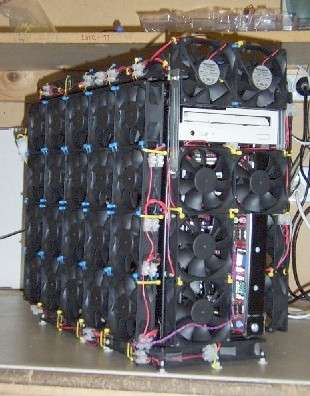
First to fans and noise....
I built it in a fairly standard case and the temps were fine and it was very quiet indeed (ASUS Qfan drops all motherboard controllable fans to basically idle, and spins them up only if needed), but I got to thinking...."what happens when I stick another 4 hard drives in, and a second videocard?" (the answer being, "it's going to either melt, or stress the fans until you lose the will to live cos of them wobbling and whining".
I then built a machine for a cow-orker using this........

3x120mm fans
1x200mm fan!!! (like you said, a helicopter)

So I got one too, my temps are now stupidly low (CPU, which is the legendarily hot Athlon variety, barely hits 40 degrees under load), and with the fans on the lowest of their 3 settings (except "blue thunder" up top, which is on full blatter) it's unnervingly quiet, though certainly louder than the 24/7 linux box, which I've beaten to a near mute. Going to get a fan controller for it, so I have full range from off to concorde takeoff. Glad I built the machine for that guy cos I would have never bought a "gamer case".
As for TFT's, well, yes there are still some issues with sub native resolutions, but if you remember to hit the "auto" config button after you switch most of them vanish. It's also worth knowing that they tend to have a higher dot pitch or lower dpi, whatever way you want to look at it, so for the fine digital artist they are a bad idea (unless you have a big chequebook). The payback for the downrezing bugs is that you can fool the buggers into almost any res if you try hard enough. My linux X server refuses to let me step through the modes on it....cos it doesn't actually report any to the computer, although it maybe due to there being a KVM in the way (a KVM more over which does not support so high a res). Mine does 1680x1050,which sounds high, but it's really only stretched 1280x1024. Getting one that goes higher than that is pricey. Physically it is (screenwise) a bit less than an inch taller and a heck of a lot wider than a 17".
TFT's do have their other quirks, their "switching time" from black to white to black is somehow crapper than CRTs though I know not why, so sometimes fast motion can look a bit blurred.
Some games do support widescreen res, mostly more modern ones obviously. Those that don't behave like a widescreen TV and use streched pixels to fit a 4:3 res onto a 16:9 16:10 14:9 whatever screen, some people hate this, I love it, it looks great in racing games. You can force it not to do that easily on ATi cards and with some thought on NV ones.
If you can get one for fuck all like I did (200 knicker, thhangyoooverrrymooch), go for it.
***NOTE**** to ANYONE thinking of getting a screen to share between a computer and TV duties, do *NO*T* buy a tv with a computer input, TV's even so called "HD" ones have appallingly low resolution compared to even basic PC monitors. If you want the one screen that fits all, buy a big monitor and a TVcard for the PC (if you have SKY or a VCR, you will want one with an analogue input, if not, you can just get a pure digital one, shove an aerial up it's hole and enjoy freeview (and the ability to dump the raw mpg to disc....errrrm in linux anyway, good luck with that in winders)
EdelBrock wrote:
Doctor? wrote: PS: Mice are for old women and kids with learning diffs.
WHO YOU CALLING AN OLD LADY!!!
You're in the field, the ops centre calls you to say there is incoming shellfire.....
which is better
A. Open the orders menu, scroll down to "manouvres", select "defensive", in the resulting page tick "incomming fire" and don't forget to tick "retreat to last position". Now select "issue", then click "all" and "yesssss I am FUCKING SURE". B. Type "incomming --run --likefuck"
Doctor? wrote:
EdelBrock wrote:
Doctor? wrote: PS: Mice are for old women and kids with learning diffs.
WHO YOU CALLING AN OLD LADY!!!
You're in the field, the ops centre calls you to say there is incoming shellfire.....
which is better
A. Open the orders menu, scroll down to "manouvres", select "defensive", in the resulting page tick "incomming fire" and don't forget to tick "retreat to last position". Now select "issue", then click "all" and "yesssss I am FUCKING SURE". B. Type "incomming --run --likefuck"
If incoming is dropping in, screw the computer...I just go running screaming like a little girl
Snorrimon wrote:
NOOLigan wrote: I need more Scotch again.
I need a lie down...
Snorri xxx
Not as bad as I do, tomorrow my 2x500GB drives arrive. I am setting them up as RAID-0 so instead of appearing as 2x 300Gb/s drives they will appear and behave as a single 1Terrabyte 600Gb/s drive (the RAID controller achieves this by writing to both at once, in reality it will not quote manage 600 as there is always some overhead loss).
My problems only begin then, I HAVE to rationalise my messy hard drives, and get all my free space tidied into contiguous blocks. I can barely picture how everything is laid out now never mind what I need to do to sort it all out.
My linux machine has nearly 30 local partitions spread accross five drives, 7 of which are NTFS which Linux cannot write to (MS do not publish standards and it's too mental to reverse engineer).
I may go insane before I am done. But if I survive I will have 2 very well appointed computers.
Thanks for the info.
(Last time I looked at TFTs it was £200 for a 19", now it seems to be £160 for a 20 or even 22". Hmmm, maybe if I wait a bit they'll pay me to take one)
Edit - I like that case. Maplin do one where the entire side of the thing is one huge fan, but I don't think it has a filter - the entire machine will fill up with dust within a month I'd have thought.